Creators often need seamless audio loops, especially when the original music track is too short for the project.
A clean loop can help you extend background music for YouTube videos, podcasts, games, livestreams, presentations, meditation sessions, fitness classes, waiting screens, menus, and social media edits without an obvious stop and restart.
The challenge is that making a smooth loop from a longer song is not always as simple as cutting a random section and repeating it.

Why making loops from songs can be difficult
Many songs are not designed to loop. They may have intros, endings, drum fills, vocal phrases, reverb tails, or chord changes that make the restart easy to hear.
That is why creators often use audio editors, DAWs, or DJ tools to find a better loop point, adjust the cut, and smooth the transition.
But if you only need a quick loop for a video, podcast, game, meditation, or presentation, you probably do not want to buy and learn a new app just for one small editing task.
Use a free online audio loop maker
Fortunately, you can make loops directly in your browser with the free TunePocket Audio Loop Maker.
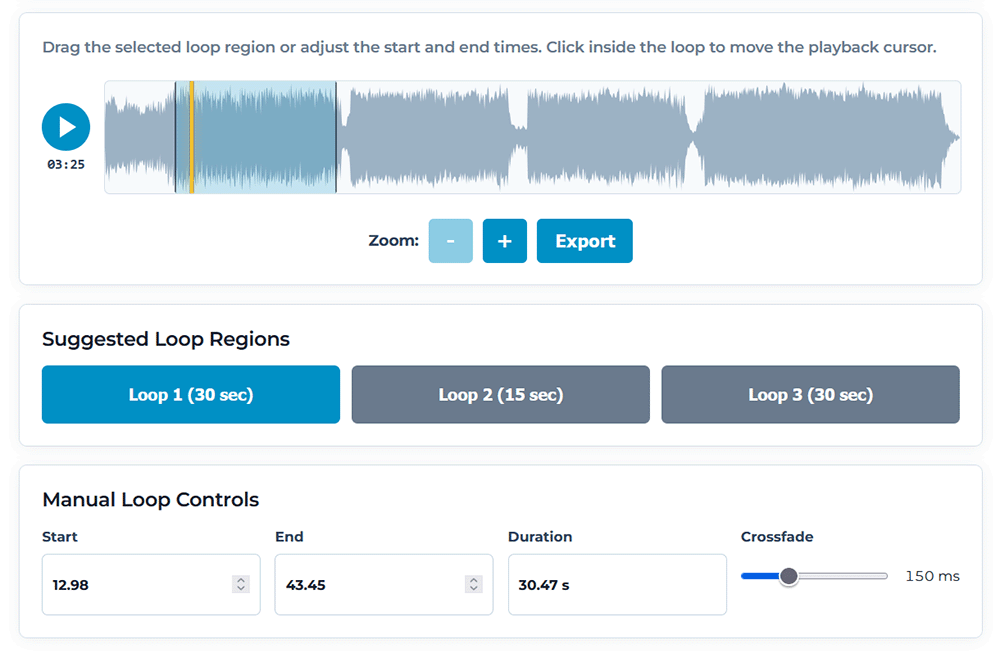
The tool is designed for a simple creator workflow. Upload your audio file, select the part you want to loop, preview the result, adjust the start and end points, and export the finished loop when it sounds right.
You do not need to install desktop software, create an account, or learn a full audio production program just to make a repeating music bed.
How to make a loop from a song
Here is the basic process:
- Open the TunePocket Audio Loop Maker.
- Upload the music, song, ambience, or sound effect you want to loop.
- Select the section that should repeat.
- Preview the loop and listen for any clicks, gaps, or awkward timing.
- Move the start and end points until the loop feels natural.
- Use optional crossfade if the transition needs to be smoother.
- Export the finished loop for your project.
The preview step is important because loop points often need small adjustments. Even a tiny change at the beginning or end of the selection can make the loop sound much smoother.
Use crossfade for smoother loops
Some loops sound good with a clean cut. Others need a little help.
The optional crossfade feature blends the end of your selected section into the beginning, which can help hide small clicks, level changes, or timing differences.
Crossfade is especially useful for ambient music, meditation tracks, cinematic textures, nature sounds, drones, pads, and other audio with sustained notes or long reverb tails.

Why TunePocket Audio Loop Maker is a good fit for creators
The TunePocket tool works well because it focuses on one practical job: helping you make a usable loop quickly.
- Free to use
You can make quick loops without buying audio editing software. - Runs in your browser
No desktop app, plugin, or DJ tool is required. - Simple visual selection
Choose the part of the audio you want to repeat and adjust it as needed. - Loops of any length
You can make short or long loops, this is entirely up to you. - Preview before exporting
Listen to the loop before downloading the final file. - Optional crossfade
Smooth out the transition between the end and beginning of the loop. - Useful for many creator workflows
Make loops for videos, podcasts, games, meditation sessions, livestreams, presentations, events, and background playback.
Bottom line
You do not need complicated audio editing or DJ software just to make a loop from a song.
If you need to turn part of a music track, ambience recording, or sound effect into a smooth repeating loop, the free TunePocket Audio Loop Maker is a fast and easy option for creators.
It gives you the key features you need, including visual selection, loop preview, export, and optional crossfade, while keeping the workflow simple enough for everyday video, podcast, game, and content production.
You may also find these free online audio tools useful for editing, converting, and preparing audio for your next project.
Have you tried making loops from songs before? Let me know what kind of project you are working on in the comments.

Subscribe to get notified about my new blog posts, freebies, and special offers