You do not need expensive audio software or complicated plugins to turn a regular song into an immersive 8D audio experience!
With the free TunePocket 8D Audio Converter, you can create the effect online, customize how the sound moves, preview the result, and download a high-quality audio file directly from your browser.

What is the 8D audio effect?
8D audio creates the impression that sound is moving around your head rather than coming from fixed left and right speakers.
Despite the name, it does not literally add eight dimensions. The effect is created through careful stereo movement, spatial processing, and reverb. It works best with headphones.
Why convert a regular track to 8D?
Moving audio can make a familiar track feel more immersive, spacious, and engaging. It can also help your content stand out from ordinary static audio.
Common uses include:
- 8D music videos for YouTube
- Meditation and relaxation audio
- Ambient and sleep content
- Experimental music and sound design
How to make 8D audio online
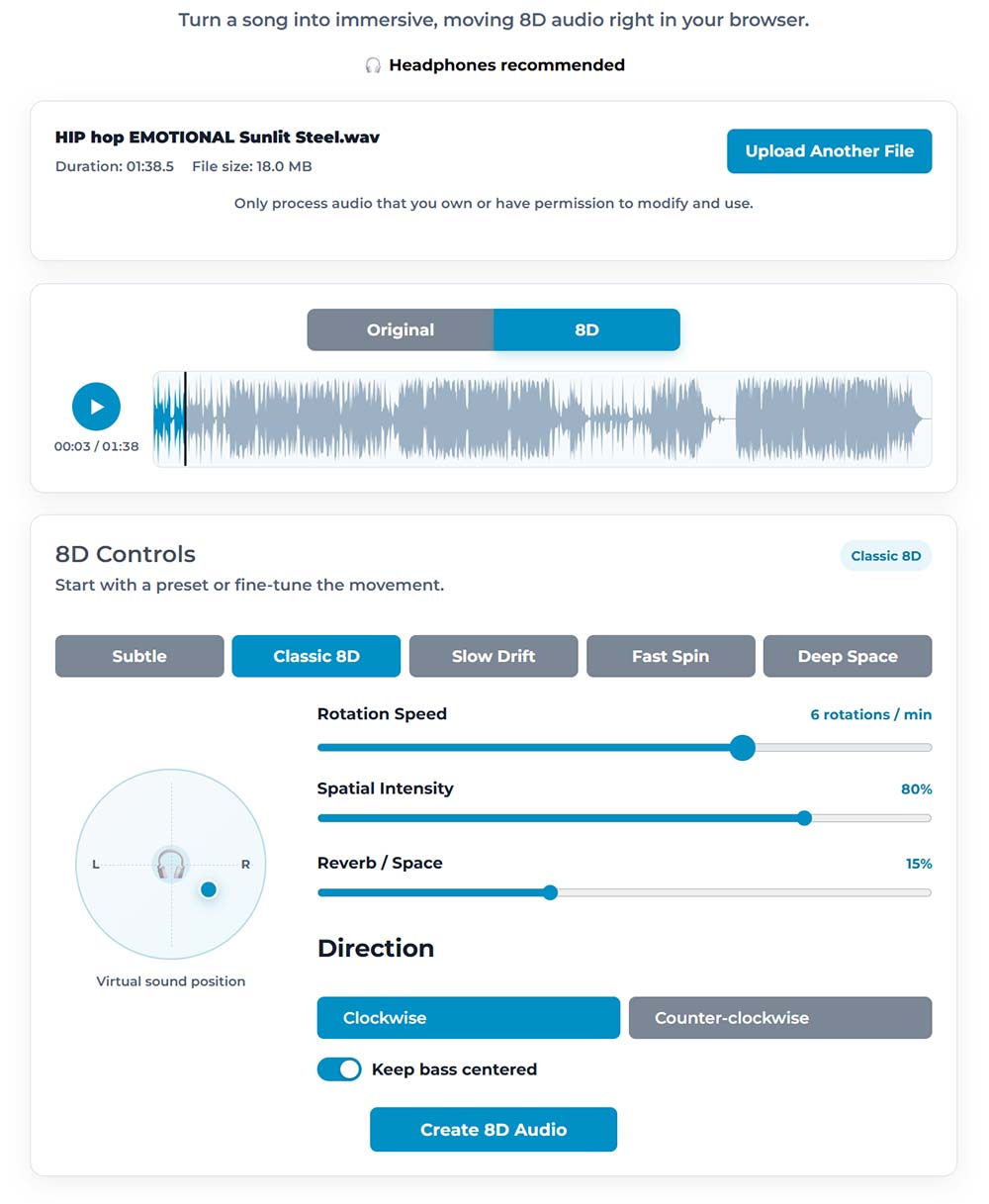
Upload a track to the 8D Audio Converter, then choose a preset such as Classic 8D, Slow Drift, Fast Spin, or Deep Space.
You can fine-tune the rotation speed, spatial intensity, reverb, and movement direction. You can also keep the bass centered for a stronger and more stable low end.
Preview the original and processed versions, adjust the settings until the movement feels right, and export the finished track.
Free, customizable, and easy to use
The TunePocket converter is completely free, works online, has no usage limits, and does not require you to create an account.
You still get high-quality results and enough control to create anything from subtle movement to a dramatic spinning effect.
Just make sure you own the audio or have permission to modify and use it.
Bottom line
If you want to turn a regular song into immersive moving audio, you do not need a DAW or a paid plugin. Put on your headphones and make 8D audio online for free.
Have you tried 8D audio in your videos or relaxation content? Let me know in the comments.

Subscribe to get notified about my new blog posts, freebies, and special offers