Sometimes you do not need a full audio editor. You simply need to put several MP3 files together, trim a few unwanted seconds, and export everything as one clean audio file.
That is exactly what the free online audio joiner is designed to do.

What makes a good MP3 joiner?
For most everyday jobs, an audio joiner should be quick and uncomplicated. Upload your files, put them in the right order, make a few adjustments, preview the result, and save the finished MP3.
TunePocket’s audio joiner does exactly that in your browser. There is no software to install and no account required.
You can combine up to 20 audio files, with a finished duration of up to 60 minutes. The tool accepts MP3, WAV, M4A, AAC, OGG, and FLAC files and exports the finished audio as an MP3.
More than simply sticking MP3 files together
A basic MP3 merger simply places one file after another. That works sometimes, but it can leave awkward pauses, abrupt transitions, or unwanted audio at the beginning and end of individual clips.
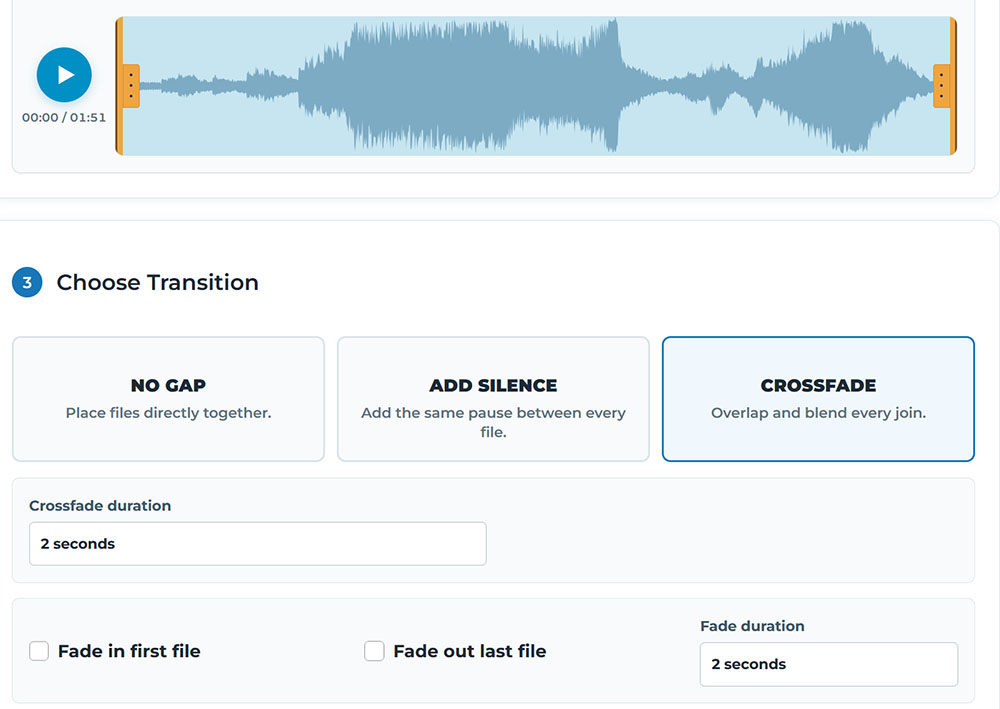
With this audio joiner / merger, you can drag files into the exact order you want and trim each individual clip directly on its waveform.
You can then choose how the files connect:
No gap places the files directly together. Add silence inserts a pause between every file. Crossfade overlaps neighboring files to create a smoother transition.
You can also fade in the first file, fade out the last one, and adjust the transition duration. Crossfades can be set up to 10 seconds.
Preview the entire combined audio before exporting
This is particularly useful when joining several longer files.
Before creating the final MP3, the tool lets you preview the combined result and shows the total duration and estimated file size. You can go back, rearrange or trim the clips, change the transitions, and preview again until everything sounds right.
When you are ready, choose the MP3 bitrate and merge the files into one downloadable MP3.
What can you use an audio joiner for?
One obvious use is combining several music tracks into a longer continuous mix. However, an audio joiner can be handy for plenty of other creator tasks.
You can combine podcast sections, interviews, narration takes, lessons, voice recordings, music for a video, intros and outros, or multiple short recordings that need to become a single file.
The silence option is especially useful for spoken audio where you want a deliberate pause between sections, while crossfades work well when joining music tracks that should flow more smoothly from one to the next.
Your audio stays private
There is another practical advantage if you are working with client recordings, unreleased music, podcasts, or other private material.
The audio is processed locally in your browser rather than uploaded to TunePocket’s server for editing.
That also means you do not have to create an account simply to merge a couple of files.

Bottom line
If you only need to combine MP3 files, opening a complicated DAW or installing another app can be overkill.
The TunePocket Audio Joiner gives you the controls that matter for this specific job: arrange, trim, add pauses or crossfades, preview, and merge.
It is free, works online without registration, supports the most common audio formats, and can create combined MP3 files up to 60 minutes long.
Need to edit a single file instead? Try TunePocket’s online audio cutter and trimmer.
Have an audio-editing task you wish you could do quickly online? Let me know in the comments!

Subscribe to get notified about my new blog posts, freebies, and special offers