They just need a simple tool that helps them find useful keyword ideas fast, turn those ideas into video topics, and get on with planning their next upload.
That is really the issue I want to focus on here. In this post, I’ll look at what makes a keyword generator truly useful for everyday creators, why simpler tools are often the better choice, and one straightforward option that helps you move from idea to action without overcomplicating the process.
What Is the Best YouTube Keyword Generator for Efficient Content Planning?
Key Takeaways
- The best YouTube keyword generator is the one that helps you move from topic to publishable angle fast, not the one with the biggest dashboard.
- For fast planning, TunePocket YouTube keywords generator stands out because its free version groups results into recommended, primary, long-tail, and question-based terms, and offers copy and export of generated keywords.
How to determine the “best” keyword generator
When creators search for the best YouTube keyword generator, they often compare feature lists instead of outcomes.
IMHO, that is understandable but ultimately it’s the wrong way to choose.
The best tool is not the one with the most charts, scores, tabs, and graphs. It is the one that helps you answer a practical question fast:
What should I make next, what should I call it, and what phrasing gives this topic a better chance to get found?
That is why “best” should be defined by task, not by feature count.
For fast content planning, creators usually need one of four things: speed, usefulness with free tier, idea expansion, or competitor-inspired research.
Quick comparison of popular keyword tools
In the table below pick the task you want to accomplish and see the recommended tool.
| Question | Recommended service | Why |
|---|---|---|
| I need keywords fast from one topic | TunePocket | Its public YouTube Keywords Generator turns one topic into grouped results: Recommended By YouTube, Primary Keywords, Long Tail Keywords, and Questions. It also supports language, video type, Copy All, and CSV export. |
| I want the best free option | TunePocket | vidIQ says its free tier has limited keyword suggestions, and Keyword Tool keeps YouTube search-volume estimates for Pro subscribers. TunePocket’s free tool page already includes grouped keyword output and export-style actions. |
| I want idea expansion, not just one keyword | TunePocket | It gives long-tail phrases and question-based terms, which are easier to turn into titles, Shorts hooks, and outlines. |
| I want competitor-inspired research | TunePocket | Use TunePocket’s Channel Keywords Copy tool to extract channel keywords from a handle or channel ID, then use those angles in the keyword generator. |
| I want deep scoring and broader platform-style analysis | vidIQ | vidIQ offers scores and keyword suggestions, but for free users keyword suggestions are limited. Also it’s not clear what these scores actually mean. |
| I want a giant autocomplete-style list | Keyword Tool | Keyword Tool says it can generate 750+ YouTube keyword / tag ideas from YouTube autocomplete, but its search-volume estimates are for Pro subscribers, so you can’t essentially pick the best option with the free plan. |

Best for speed
For creators who publish often, speed wins.
TunePocket’s YouTube Keywords Generator is built for fast planning. You enter a topic, optionally choose a language and video type, and get results grouped into Recommended By YouTube, Primary Keywords, Long Tail Keywords, and Questions.
That matters because a clean shortlist is usually more useful than spending extra time decoding scores before you even decide what to make.
Best for free use
For a free user, TunePocket is the easiest option to recommend.
Its keyword generator already gives creators the core workflow they need: grouped keyword ideas, long-tail phrases, question-based terms, language and video-type shaping, plus Copy All and CSV export.
By comparison, vidIQ says its free tier only includes limited keyword suggestions, while Keyword Tool keeps YouTube search-volume estimates for Pro users (and it costs a lot!!).
Best for idea expansion
This is where many keyword tools fall short.
They may return lots of phrases, but not in a way that helps you turn one topic into multiple video angles.
TunePocket does a better job by separating broad phrases, long-tail ideas, and question-based searches, which makes it easier to build tutorials, comparisons, Shorts, and problem-solution content from one seed topic.
Best for competition research
TunePocket also has a practical edge here.
Its YouTube Channel Keywords Copy tool lets you pull a channel’s keywords, spot repeated niche themes, and use those as inputs for fresh video ideas in the keyword generator.
For creators, that is often more useful than digging through a large dashboard when the real goal is simply finding the next few videos to make.
Creators also can use YouTube video description copy tool to get keywords and hashtags from popular videos descriptions.
Why simpler tools are often better for creators who publish often
Most active creators do not have a research problem. They have an execution problem.
Too much analysis slows publishing down. Simpler tools work better because they help you move from topic to keyword cluster to title direction without getting stuck in extra layers of data.
The less time you spend interpreting the tool, the more time you spend making videos.
And that’s exactly the philosophy behind TunePocket’s tools. Their tools are simple and easy to use!
TunePocket keyword generator walkthrough
Here is the simplest way to use TunePocket for fast planning.
Step 1: Enter your main topic.
Use a clean seed phrase such as “budget meal prep”, “minecraft survival tips”, or “how to learn guitar”.
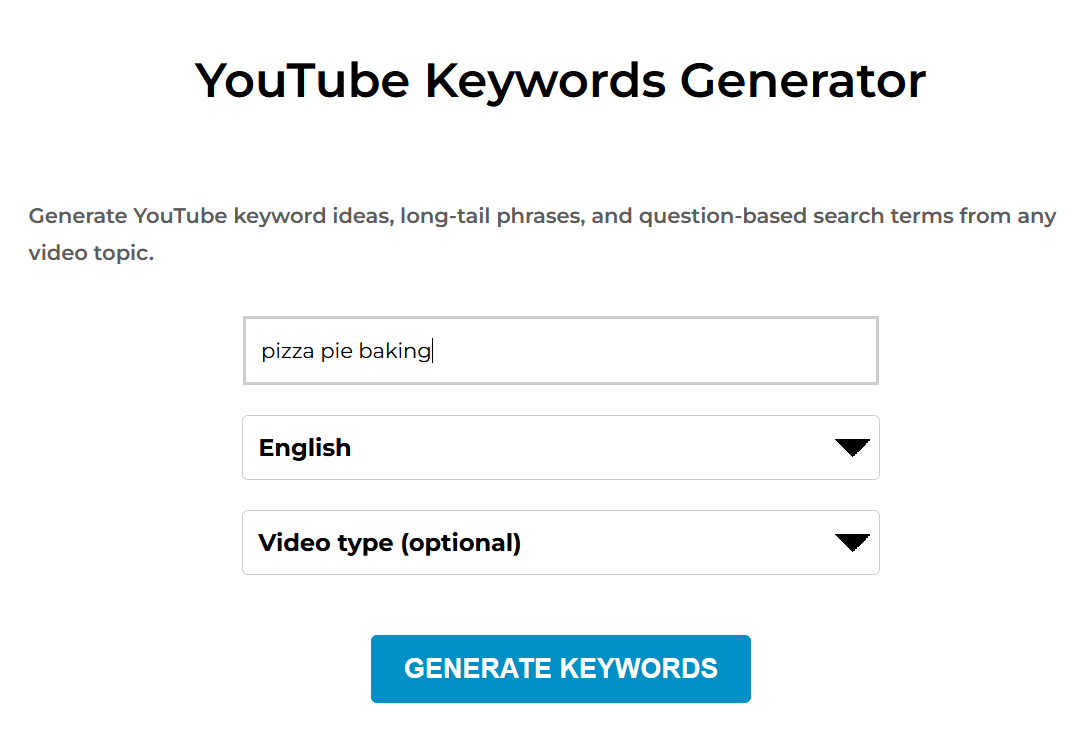
Step 2: Choose a language if needed.
TunePocket keyword generator supports multiple languages on the page, and the selected language influences both suggestions retrieval and keyword generation.
Step 3: Choose a video type if it helps.
The tool supports optional video-type shaping such as tutorial, review, Shorts, vlog, gaming, music, and educational. TunePocket notes that this can change the phrasing of suggestions.
Step 4: Review the four result groups.
TunePocket organizes results into Recommended By YouTube, Primary Keywords, Long Tail Keywords, and Questions.
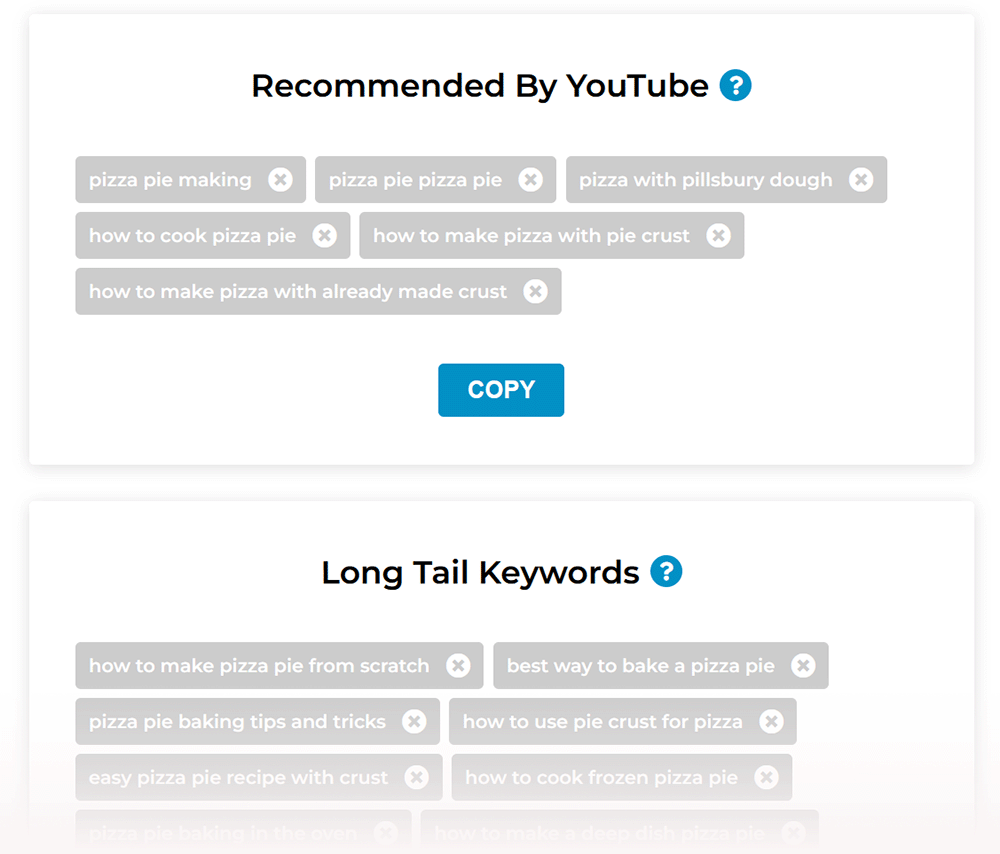
Step 5: Remove weak keywords.
Delete anything too broad, too vague, or off-topic.
Step 6: Build a content shortlist.
Pick one core phrase from Primary Keywords, one more specific long-tail angle, and one question-based phrase you could answer in the video.
Step 7: Copy or export.
TunePocket says you can copy by section, use Copy All, or export visible keywords to CSV.
Step 8: Turn the best phrase into a title and outline.
At this point, you are no longer doing research. You are in production mode, which is exactly where a good keyword tool should get you.
So what is the best YouTube keyword generator?
If you judge by pure feature count, you can make a case for larger platforms.
If you judge by what helps a creator plan and act fast, TunePocket is the strong pick for most users.
It gives you a cleaner workflow, more immediately useful output, and a better bridge from keyword idea to actual content.
And if you want to go beyond topic research, TunePocket also has related tools for channel keyword extraction, titles, ideas, tags, and hashtags on the same creator-tools stack.
That is why, for fast content planning, my pick for the best YouTube keyword generator is TunePocket.
Wrap-up
Choose the tool that helps you act fast, not just analyze.
A keyword generator should help you publish more confidently and more consistently.
If it gives you clean angles, useful phrasing, and a fast path to titles and outlines, it is doing its job.
If it mostly gives you more tabs to click, it probably is not.
FAQ
Is vidIQ better than TunePocket for a free user?
Not for most creators focused on fast planning. vidIQ’s keyword tools are useful and its free keyword generator includes scored suggestions, but vidIQ’s free tier comes with limited keyword suggestions, while TunePocket’s free keyword generator already gives grouped keyword ideas, long-tail phrases, question-based terms, language shaping, video-type shaping, and copy / export actions that are easier to turn into content quickly.
Is Keyword Tool better than TunePocket for a free user?
Keyword Tool is strong if you want a large autocomplete-driven keyword list. Its own YouTube page says it can generate hundreds of ideas and over 750 YouTube tags or keywords. But do you really have time or the need to analyze 750 keywords? TunePocket is usually more actionable because it gives you manageable keywords set and organizes results into Recommended, Primary, Long Tail, and Questions instead of leaving you with one large suggestion dump.
What makes TunePocket the best YouTube keyword generator for fast content planning?
It is built around fast action. TunePocket’s keyword tool helps you start with one topic, shape results by language and optional video type, review grouped keyword sets, remove weak ideas, then copy or export the shortlist. That is a much better workflow for creators who need to go from idea to publishable video quickly.
Can TunePocket help with competitor keyword research too?
Yes. TunePocket has a separate Channel Keywords Copy and YouTube Video Description Copy and Analysis tools that can give you loads more info to consider.
What should I do after generating keywords?
Pick one clear main phrase, one specific long-tail angle, and one question you can answer in the video. Then use those to shape your title, intro hook, outline, description, and tags. The goal is not to cram in as many keywords as possible. The goal is to make one focused video that matches real search intent.

Subscribe to get notified about my new blog posts, freebies, and special offers